The Complete Guide to Writing Effective AI Prompts
A practical, in-depth guide to writing effective AI prompts for text and image generation. Learn the core components, advanced strategies, real-world templates, and workflows that help you create faster, more consistent, and more on-brand content with AI.
Generative AI has moved from a futuristic concept to an everyday business essential. In fact, according to the Microsoft Trend Index 2024, 75% of global knowledge workers already use generative AI (this number is nowadays probably even higher). From drafting blog posts to designing visuals and writing code, it's reshaping how we create, communicate, and compete.
But behind every impressive AI output lies one simple truth – it all starts with the prompt.
As MIT Sloan puts it, a prompt is "your input into the AI system to obtain specific results. In other words, prompts are conversation starters: what and how you tell something to the AI for it to respond in a way that generates useful responses for you."
Writing a prompt is both an art and a science – part creativity, part logic – and it's quickly becoming a must-have skill for marketers, creators, and business leaders alike. A well-written prompt can unlock clarity, creativity, and scale. A weak one can waste time, produce off-brand results, and leave teams editing for hours.
In this guide, we'll unpack what prompts really are, why they matter, and how to write them effectively across text and image generation. You'll learn the building blocks of a great prompt and get some real-world examples.
What Is an AI Prompt (and What Is Prompt Engineering)?
At its core, a prompt is a set of instructions or inputs you give to a generative AI system to guide its response. It can be a question, a command, or even a block of structured context, but the goal is always the same: to help the AI understand what you want and how you want it delivered.
When you type a request into ChatGPT, ask an image model to "create a cinematic portrait in warm lighting" or feed structured data into a code assistant, you're writing prompts. Every word, constraint, and example you include influences the quality and relevance of what comes back.
Prompt engineering refers to the practice of crafting, refining, and structuring those inputs so the AI delivers outputs that are accurate, on-brand, and fit for purpose. It's the bridge between human intent and machine interpretation, and a skill that transforms a generic command into a high-quality result.
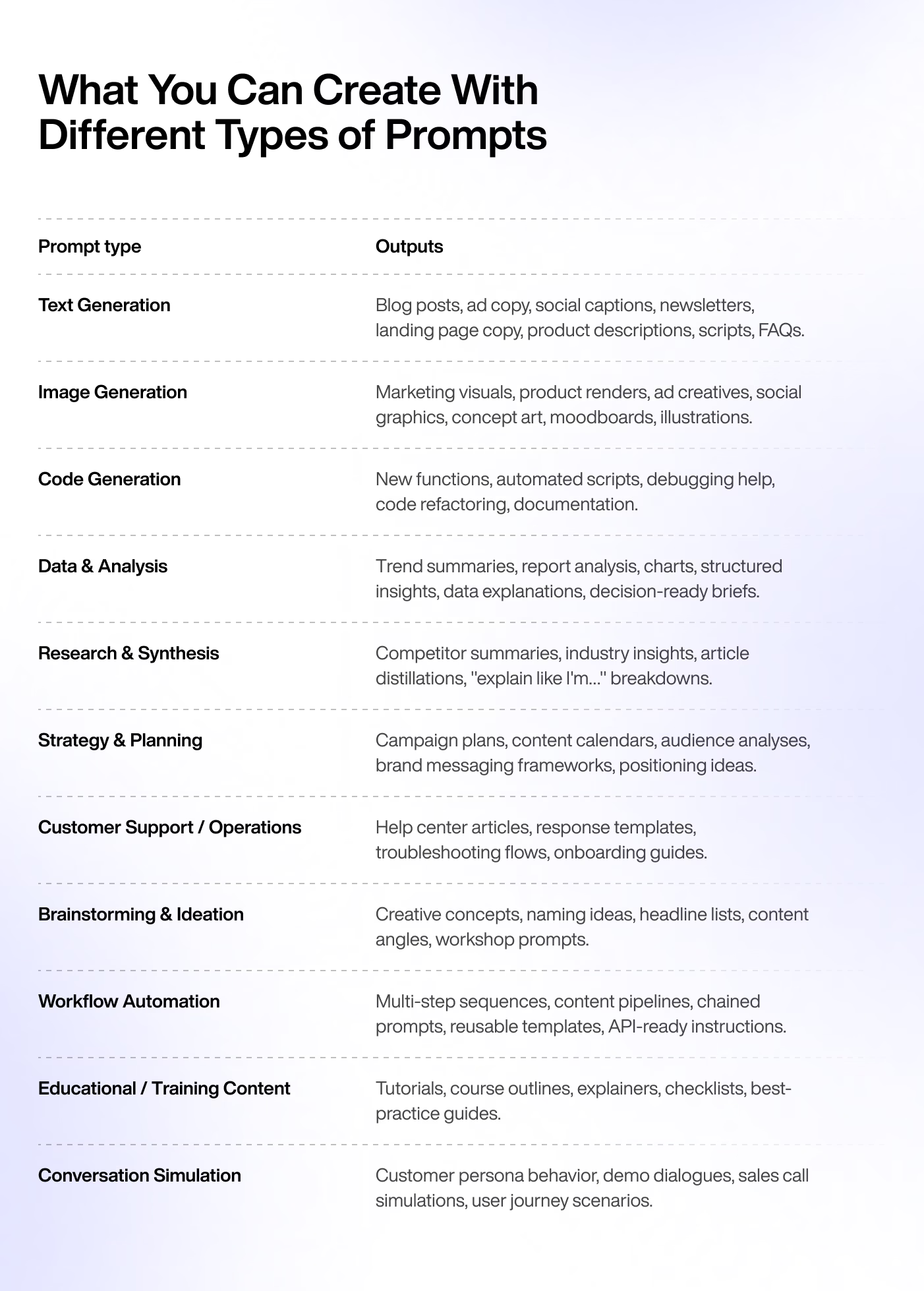
Prompt engineering isn't limited to text. Prompting applies across every generative medium, from words and visuals to code and data.
Text-generation prompts power everything from blog drafts and ad copy to customer emails.
Image-generation prompts describe what should appear visually, including subject, style, color, and mood.
Code prompts can generate functions, automate processes, or even debug existing code.
Data prompts help analyze trends, summarize reports, or visualize insights.
Why Writing Great Prompts Matters for Business & Marketing
For businesses and marketing teams, writing a strong prompt isn't just a technical skill – it's a strategic advantage. McKinsey's 2023 report estimates that generative AI could contribute up to $4.4 trillion in annual economic value, underscoring how crucial effective prompting is for capturing ROI.
A well-structured prompt ensures that AI output aligns with your brand's goals, voice, and audience expectations. It's the difference between content that sounds generic and content that sounds like you. If you’re exploring where prompts fit into your stack, our overview of the best AI tools in marketing is a good place to see how strategy, tooling, and prompting come together.
Aligning AI with Brand and Audience
High-quality prompts help AI reflect your brand's tone, values, and priorities. By embedding brand voice and audience insights directly into your instructions, you guide the AI to produce messaging that feels consistent and authentic.
Driving Efficiency Across Teams
As content demands grow, consistency becomes harder to maintain. Strong prompts help keep messaging aligned across campaigns, markets, and formats. They act as a scalable framework, ensuring that every piece of AI-generated text or image meets your quality standards, no matter who's producing it.
Prompting for Text Generation
When working with text-based AI models, the quality of your output depends entirely on how clearly you define the task. A great text prompt gives the model direction, context, and boundaries – just like a detailed creative brief does for a writer. Anthropic's prompt engineering overview for Claude highlights the same pattern: be explicit about role, audience, format, and success criteria if you want outputs that are reliable and on-brand.
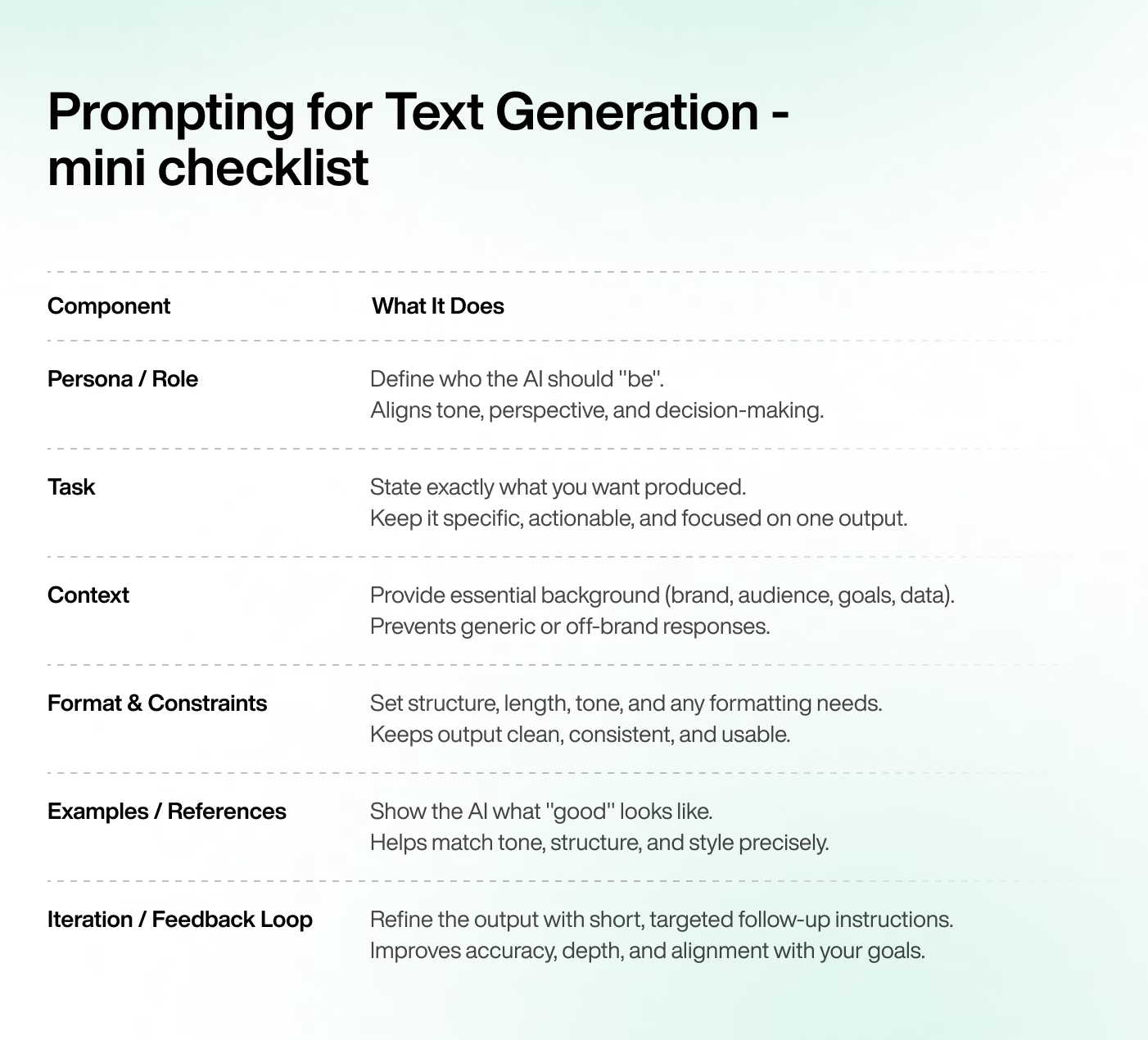
In this section, we'll break down the key components of an effective text prompt: defining the right persona or role, giving the model a clear task, providing rich context, setting format and constraints, adding examples or references, and finally, refining the output through an iteration loop.
Each element builds on the next. Together, they form a reliable framework for producing accurate, high-quality, and on-brand content at scale.
Persona/role
Every piece of writing starts with a perspective. In AI prompting, that perspective comes from defining a persona or role. Telling the mode who it is shapes how it thinks, speaks, and prioritizes information. It's a simple addition that can completely change the tone, structure, and depth of the output.
Personas also help manage complexity. For example, a journalist persona will write more factually and with curiosity, while a creative director persona will focus on storytelling and visual flair.
By defining that perspective upfront, you reduce back-and-forth editing and get closer to your desired result on the first try.
Example 1: Senior Content Marketer Persona
Prompt example: You are a senior content marketer for an eco-friendly fashion brand. Write a LinkedIn post announcing the launch of a new sustainable clothing line.
This persona nudges the AI to focus on themes like sustainability and community. The tone becomes professional yet relatable, and the output is likely to emphasize product benefits through the lens of brand purpose and audience connection.
Example 2: Data-Driven Growth Marketer
Prompt example: You are a data-driven growth marketer. Summarize three key marketing insights from the latest campaign analytics report.
Here, the role frames the model to think analytically and prioritize clarity over creativity. The expected output will be structured, concise, and focused on measurable takeaways, which is ideal for reports or internal presentations.
Example 3: Tech Journalist
Prompt example: You are a tech journalist writing for a mainstream publication. Explain the concept of generative AI to a non-technical audience.
This persona guides the AI to communicate complex ideas in plain language. The model will likely use accessible analogies, avoid jargon, and keep the tone informative but conversational.
Task
Once the role is defined, the next step is to clearly state what you want the AI to do. This is the task, the core instruction that tells the model what kind of output to produce. A well-written task is specific and actionable. It removes ambiguity, ensuring the AI understands the format, purpose, and intent behind your request.
Being too broad can lead to unfocused results. A precise task helps the model narrow its scope and deliver relevant, structured content. Clear tasks reduce the need for multiple revisions and make the AI more efficient as a creative partner.
Example 1: Blog Outline Task
Prompt example: Write a 1,200-word blog outline about how small businesses can use AI tools to improve customer engagement.
This task gives the AI both a topic and a clear deliverable. You can expect a structured response that includes sections, logical flow, and potential talking points. It's going to be ready for further expansion into a full article.
Example 2: Product Description Task
Prompt example: Write a 100-word product description for a new noise-cancelling headphone mode designed for frequent travelers.
Here, the task defines the format, length, and focus. The AI will likely produce concise, benefit-driven copy that highlights features and value, making it easy to drop directly into an e-commerce page.
Example 3: Social Media Post Task
Prompt example: Write a short Instagram caption announcing the launch of a limited-edition summer drink collection.
This task guides the AI to create content that's short, engaging, and optimized for social platforms. The model will likely emphasize tone and emotion – something fun, punchy, and shareable.
Context
If the task tells the AI what to do, the context tells it how and why. Context provides the background information the model needs to deliver relevant, on-brand, and goal-oriented results. It includes details such as your brand voice, audience profile, key message, product information, or even snippets of past content.
Without context, the model fills in the blanks with assumptions – often producing generic or off-brand output. Adding a few lines of background dramatically improves accuracy and tone. It helps the AI mirror your brand identity, reflect your priorities, and stay aligned with the purpose behind the content.
Example 1: Brand Context for a Blog Post
_Prompt example: You are a senior content marketer for an eco-friendly fashion brand. Write a 1,200-word blog post about the future of sustainable materials.
Context: The brand targets eco-conscious millennials who value style and ethics equally. Our tone is optimistic, informative, and forward-looking._
This context helps the AI balance authority with accessibility. The model will likely highlight innovation and environmental impact in a way that connects emotionally with the target audience.
Example 2: Audience Context for a Newsletter
_Prompt example: Write an introductory paragraph for a newsletter about productivity tools.
Context: The audience is a mix of startup founders and freelancers looking for practical, time-saving tips. Keep the tone friendly, relatable, and professional._
The added audience context shapes both tone and vocabulary. The AI will likely produce a conversational opening that feels personal yet credible, setting the right tone for a business-oriented readership.
Example 3: Data Context for a Press Release
_Prompt example: Write a 300-word press release announcing our company's record-breaking Q4 results.
Context: Revenue grew 40% year-over-year. Customer satisfaction reached 92%. The company expanded into two new markets. Maintain a confident, professional tone suitable for media distribution._
Here, the context gives the AI concrete data and desired tone, which results in a polished, fact-based release. Instead of vague claims, the output is more likely to include compelling proof points and business impact.
Format & Constraints
Once you've defined the role, task, and context, the next step is to tell the AI how you want the output delivered. Format and constraints define the structure, tone, and boundaries of the response. They include elements such as length, style, layout, and specific formatting requirements.
Example 1: Structure Format for a Blog Outline
_Prompt example: You are a senior content strategist. Create a blog outline about AI-powered customer service tools.
Format and constraints: Use clear section headings (H2 and H3). Include brief descriptions under each, and limit the outline to 400 words. _
This structure encourages the AI to produce a concise, well-organized outline. The format instructions ensure the output can be used directly for planning or content production without heavy editing.
Example 2: Tone and Style for Social Copy
_Prompt example: You are a social media manager for a coffee brand. Write three short X posts promoting our new cold brew line.
Format and constraints: Keep each post under 280 characters. Use a playful tone, and end with branded hashtags._
The format rules keep the AI within platform limits and ensure a consistent tone. You can expect catchy, short, and fun brand-aligned messages.
Example 3: Length and Voice for Email Marketing
_Prompt example: You are a copywriter working in a tech company, and you need to write an email. An email should announce a new product launch.
Format and constraints: Limit to 150 words. Maintain a friendly, yet professional tone. Include a clear call to action. _
By setting limits, you help the AI stay concise and on point. Expect an email that feels lively, easy to read, and built to make readers click
Examples / References
One of the most effective ways to guide an AI model is to show it what "good" looks like. Examples and references act as creative anchors. They demonstrate tone, structure, or style, helping the model understand the standard you expect.
In this part of your prompt, you can include sample sentences, past brand content, or tone guidelines that define what's in (and out) of scope.
Example 1: Tone Reference for Writing a Blog
_Prompt example: You are a senior content writer who works in a marketing agency. Write a blog introduction about why storytelling improves brand engagement.
Reference: Use a tone similar to Recommend's blog: clear, human, and smart._
By referencing an established brand voice, you help the AI mirror a specific writing style, which it excels at.
Example 2: Structural Reference for Case Studies
_Prompt example: Write a one-page case study about a company that used AI to reduce content production time by 40%.
Reference: Follow this structure: challenge → approach → results → takeaway._
Here, the example provides a ready-made framework. The AI will organize the content logically, keeping it focused on outcomes and ensuring the result fits professional business formats.
Example 3: Style Reference for Social Copy
_Prompt example: You are a social media manager for a travel brand. Write three Instagram captions about summer destinations.
Reference: Match the tone with our winter campaign. Make it warm, adventurous, and emotionally engaging. _
This kind of brand reference ensures continuity across campaigns. The AI will pick up on emotional cues and phrasing patterns, helping the new posts sound cohesive and instantly recognizable.
Iteration / Feedback Loop
Even the best prompt rarely gets it perfect the first time. That's why iteration – refining your prompt based on feedback – is one of the most valuable parts of the prompting process. Each round helps you clarify what works, adjust what doesn't, and move closer to the result you actually need.
Think of it as a conversation, not a command. When you give the AI targeted feedback, the model learns your intent and fine-tunes the output. Over time, this back-and-forth becomes a repeatable workflow that consistently produces better, faster results.
Iterative prompting isn't just a safety net: it's a best practice.
Example 1: Refining Tone and Clarity
_Prompt example: Write a short product description for our new smartwatch.
Follow-up prompt: The tone feels too technical. Make it more lifestyle-focused and highlight the benefits for everyday users. _
By giving clear, targeted feedback, you steer the AI toward a tone that better fits your audience. The next version will likely feel more human and approachable.
Example 2: Expanding Depth and Detail
_Prompt example: Write a blog intro about the importance of sustainable packaging.
Follow-up prompt: Add a short stat or research insight to make it more credible and data-driven._
Here, you're not rejecting the output. Instead, you're enhancing it. A small tweak can elevate the content from surface-level to informative, giving to more authority and reader appeal.
Example 3: Optimizing Structure for Readability
_Prompt example: Summarize our company's latest quarterly results in 300 words.
Follow-up prompt: Break it into bullet points for key takeaways and keep the language concise._
This feedback directs the AI to reformat rather than rewrite. The result will be easier to scan and more suitable for reports or executive updates.
Prompting for Image Generation
Image models respond to detail, specificity, and visual cues, which means the way you write image prompts is different from text. Instead of guiding narrative or tone, you're shaping composition, style, and mood.
In this section, we'll break down how image prompts work, the key components to include, practical templates you can reuse, and simple techniques to get clearer, more consistent results for marketing visuals, ad creatives, and everyday content production.
H3 How Image Prompts Differ from Text Prompts
As mentioned above, text prompts guide ideas, arguments, or narratives. But image prompts guide visual composition. Instead of focusing on tone or structure, you're defining what something should look like: the subject, style, lighting, perspective, and overall mood.
Image models rely on descriptive detail. A vague prompt like "a mountain landscape" could generate hundreds of interpretations. But when you add specifics – "a wide-angle shot of a snow-covered mountain at sunrise, soft golden light, minimalist style" – the output becomes far more intentional and consistent.
Another key difference: image prompts often benefit from negative prompts, instructions about what to exclude. This helps avoid elements that distract from the concept or clash with your brand style.
In short, image prompting is about painting with words. The clearer your description, the closer the AI gets to your creative vision.
Key Components of an Image Prompt
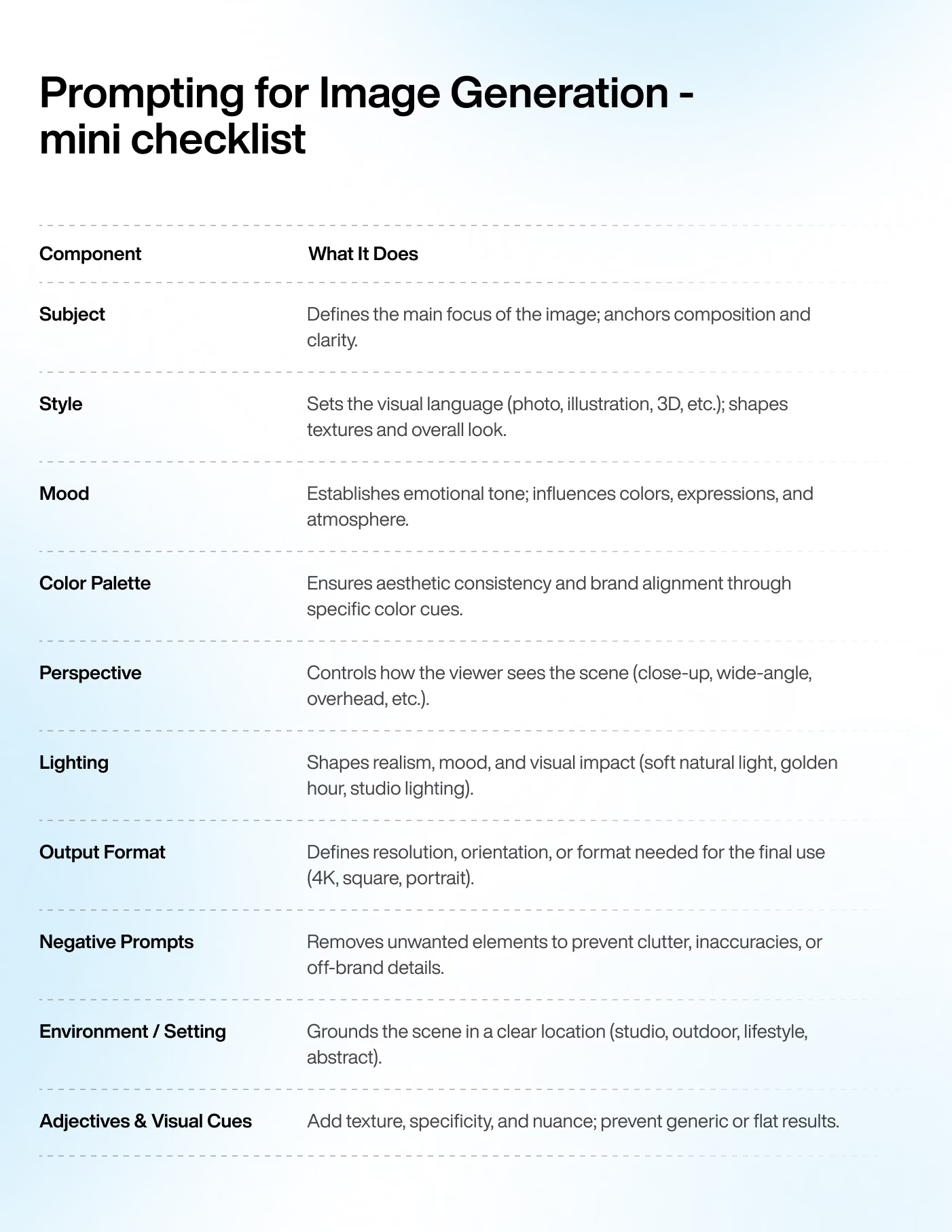
A strong image prompt breaks the visual idea into clear, intentional parts. Each part helps the model understand what to include, how it should look, and the overall feeling you want to create. When these elements work together, you get images that match your creative direction. Google's Vertex AI image prompt guide demonstrates how tweaking attributes like subject, style, lighting, and color palette produces dramatically different image variations from the same base idea.
Subject: the subject is the core of the image. It's the main thing you want the AI to focus on. Describe it clearly. Include every defining trait you can think of: age, material, setting, scale… The more specific you are, the easier it is for the model to center the composition around the right focal point.
Style: style determines the visual language of the image. It can be realistic photography, watercolor illustration, cyberpunk, or minimalism, just to name a few. Style cues help the model pick the right textures, shapes, and overall artistic direction.
Mood: mood sets the emotional tone of the image. It can be calm, energetic, mysterious, playful, dramatic… Mood influences colors, composition, and even how the subject is portrayed.
Color palette: a defined color palette ensures the final image feels cohesive and on-brand. You can reference specific colors, describe a palette (pastel, monochrome, vibrant), or tie it to a setting like "warm sunset tones". This helps control the aesthetic and makes the final output easier to use in campaigns.
Perspective: perspective shapes how the viewer sees the scene (is it a close-up, wide-angle, overhead, eye-level…). It affects composition, depths, and storytelling. A clear perspective helps the AI frame the image in a way that matches your intended use.
Lighting: lighting dramatically changes mood, clarity, and atmosphere. You can specify soft natural light, dramatic shadows, neon lighting, golden hour, studio lighting, or anything else that sets the scene. Good lighting instructions often make the difference between an average image and a standout one.
Output format: this defines the type of quality of the final image, such as "high resolution", "4K render", "square format", or "portrait orientation". It ensured the image meets the requirements for where it will be used, whether that's social media, ads, or printed materials.
Templates for Image Prompts
Image prompt templates make the creative process faster and more consistent. Instead of building every prompt from scratch, you can start with a proven structure and adapt it to your style, brand, or campaign needs.
The templates are, of course, flexible. Swap the subject, adjust the mood, refine the lighting, or change the palette to match your visual identity.
Templates are meant to be used as a foundation. Tweak the details until the output feels unmistakably yours
Examples of Social Media Visual Templates
Template 1
A high-contrast photo of [subject], shot in [style] with [lighting], set against a clean background in [color palette]. Square format, optimized for Instagram.
Template 2
A bold, minimal illustration of [subject], using flat colors and simple geometric shapes. Bright, modern palette with a friendly, upbeat mood. Designed for social media engagement.
Template 3
A dynamic lifestyle shot of [subject] in a real-world setting, captured in a candid, documentary style. Soft natural lighting and warm tones. Ideal for Instagram Stories and TikTok cover frames.
Product & eCommerce Templates
Template 1
A studio-quality product photo of [item], centered on a seamless background in [color]. Sharp details, soft shadows, and high-resolution clarity. Perfect for eCommerce listings.
Template 2
A 3D render of [product], shown from a 45-degree angle with clean reflections and precise lighting. Neutral palette with subtle highlights. High-resolution output for product pages.
Template 3
A close-up macro shot of [product feature], emphasizing texture and material quality. Controlled studio lighting and shallow depth of field.
Ad Creative Templates
Template 1
A bold, high-impact visual of [subject] in [style], with dramatic lighting and strong contrast. Clear focal point and minimal background elements. Ideal for performance ads.
Template 2
A polished, premium-looking photo of [product] placed in a lifestyle context that highlights its benefits. Warm lighting, clean composition, and space for ad copy.
Template 3
A vibrant, attention-grabbing graphic of [subject] in a modern illustration style. Bright palette, playful shapes, and a clear visual hierarchy. Designed for multi-platform ad campaigns.
Brand & Editorial Templates
Template 1
A cinematic portrait of [subject] with soft, directional lighting and a muted, sophisticated palette. Editorial style suitable for hero banners or magazine-like layouts.
Template 2
A high-resolution hero image of [subject] in a clean, minimalist aesthetic. Balanced composition, plenty of negative space, and a calm, refined mood.
Template 3
An expressive, documentary-style photo of [subject] in a real environment. Natural light, subtle color grading, and an authentic, human feel.
Concept Development / Moodboard Templates
Template 1
A collection of concept visuals showing [subject] in multiple styles: minimalist, futuristic, organic, and vintage. Soft lighting and consistent framing for moodboard use.
Template 2
A stylized concept illustration of [idea], blending [art style] with [color palette]. Emphasis on shape language and overall atmosphere.
Template 3
A series of exploratory renders of [product or theme], each experimenting with different textures, lighting conditions, and visual tones. Created for early-stage ideation.
Business Use Cases
Strong image prompts aren't just a creative bonus. They unlock real value across marketing workflows. Clear, detailed prompts help teams generate visuals that match brand identity, campaign goals, and platform requirements. Whether you're testing concepts, producing ad variations, or scaling content, image prompting gives teams a faster, more flexible way to create high-quality assets.
Marketing visuals: image prompts can quickly generate concepts for landing pages, email hero images, or campaign banners. Instead of waiting on multiple design rounds, teams can explore different visual directions in minutes and refine the best ideas. This speeds up production while keeping brand standards intact.
Ad creatives: paid media requires variation and constant testing. Prompted images make it easy to produce multiple versions of a visual, with different angles, moods, or compositions, without slowing down the process.
Social posts: social content thrives on freshness and speed. With well-written prompts, marketers can produce on-brand visuals for product teasers, event announcements, or trend-based content. This helps teams keep up with fast-moving platforms without sacrificing quality.
Templates and Real-World Prompt Examples
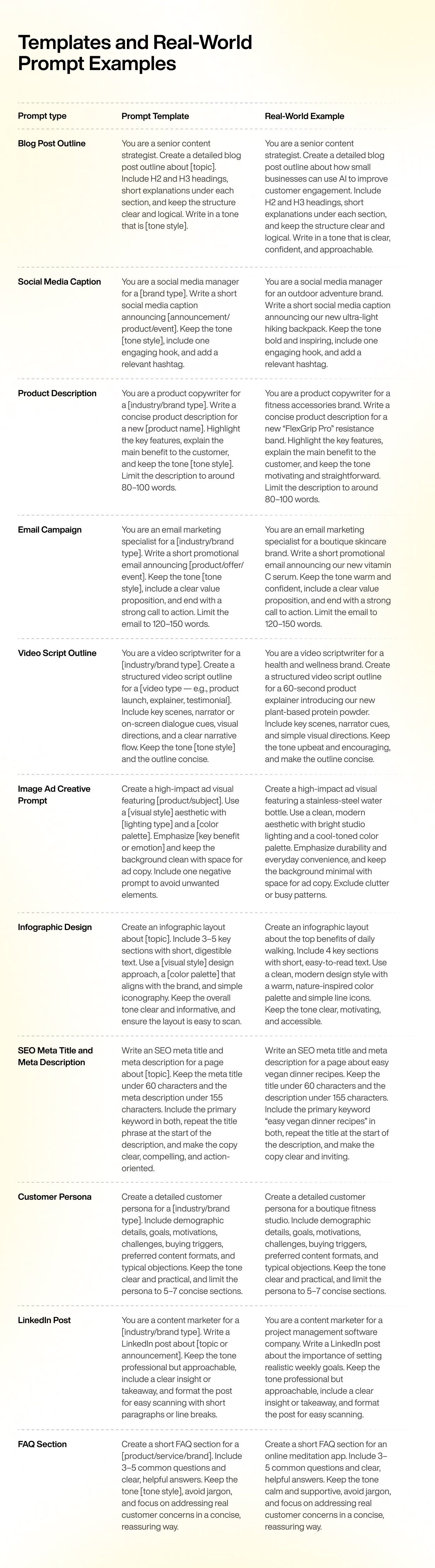
To make prompt writing easier and more practical, this section brings together a set of ready-to-use templates you can adapt to your own brand, audience, and campaigns. Each example includes the prompt itself, a short explanation of how it's structured, and a real-world version you can test immediately.
Use these templates as starting points. Swap the tone, context, or persona, and tweak the details until the output feels aligned with your voice and goals.
Blog Post Outline
Prompt template: You are a senior content strategist. Create a detailed blog post outline about [topic]. Include H2 and H3 headings, short explanations under each section, and keep the structure clear and logical. Write in a tone that is [tone style].
Prompt template explanation:
assigns a clear role (senior content strategist, which ensures strategic thinking)
defines the task (outline) and the structure (H2s, H3s, explanations)
topic and tone style direct the AI toward the right subject and voice, making it easy to adapt the prompt for different campaigns, industries, or audiences
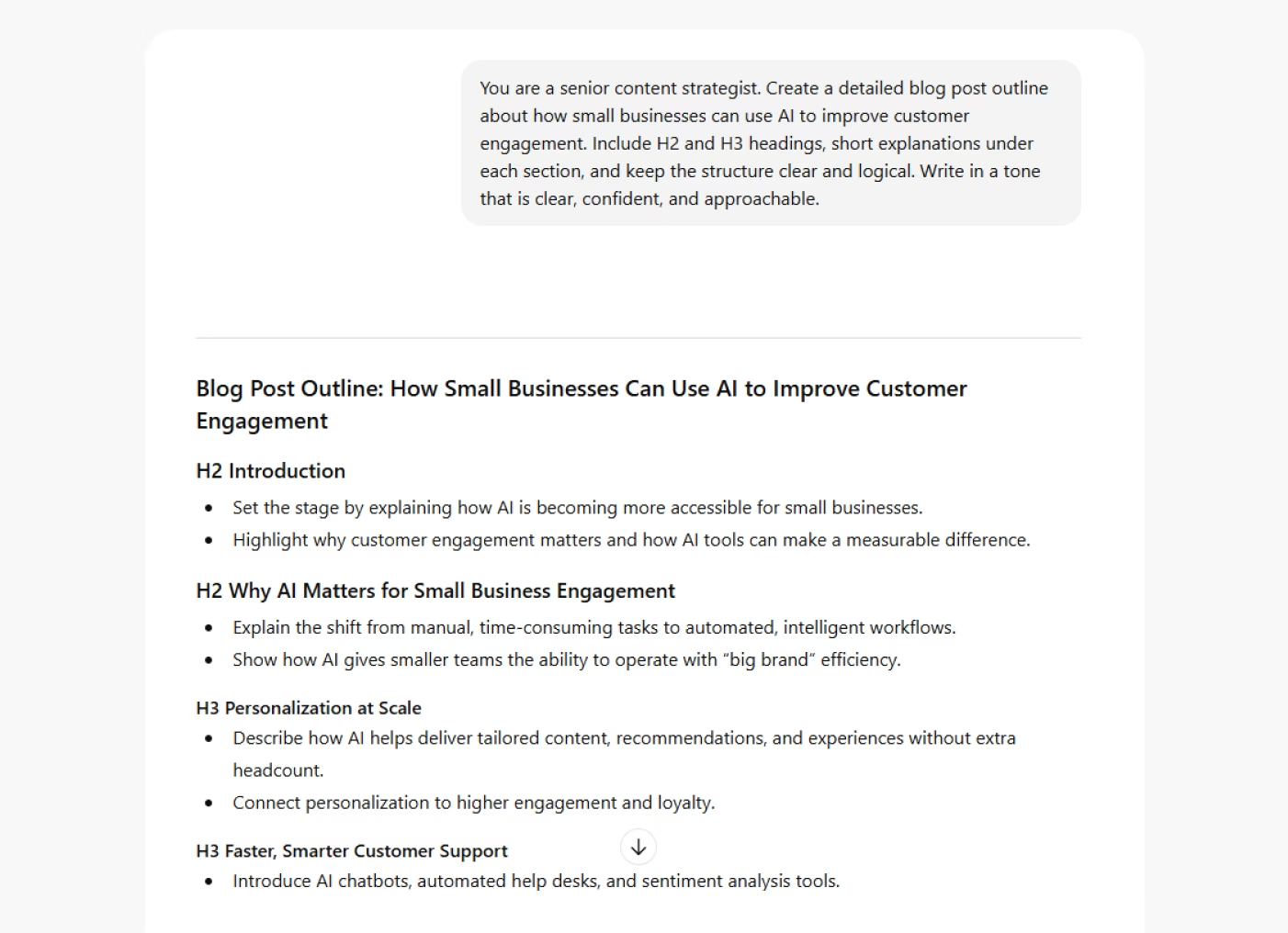
Real-world example: You are a senior content strategist. Create a detailed blog post outline about how small businesses can use AI to improve customer engagement. Include H2 and H3 headings, short explanations under each section, and keep the structure clear and logical. Write in a tone that is clear, confident, and approachable.
Social Media Caption
Prompt template: You are a social media manager for a [brand type]. Write a short social media caption announcing [announcement/product/event]. Keep the tone [tone style], include one engaging hook, and add a relevant hashtag.
Prompt template explanation:
assigns a clear role to guide tone, pacing, and platform-friendly language
defines the task (short caption) and the occasion (announcement/product/event)
brand type and tone style are used to tailor the caption to the brand voice
ensures the output stays concise, engaging, and optimized for social media
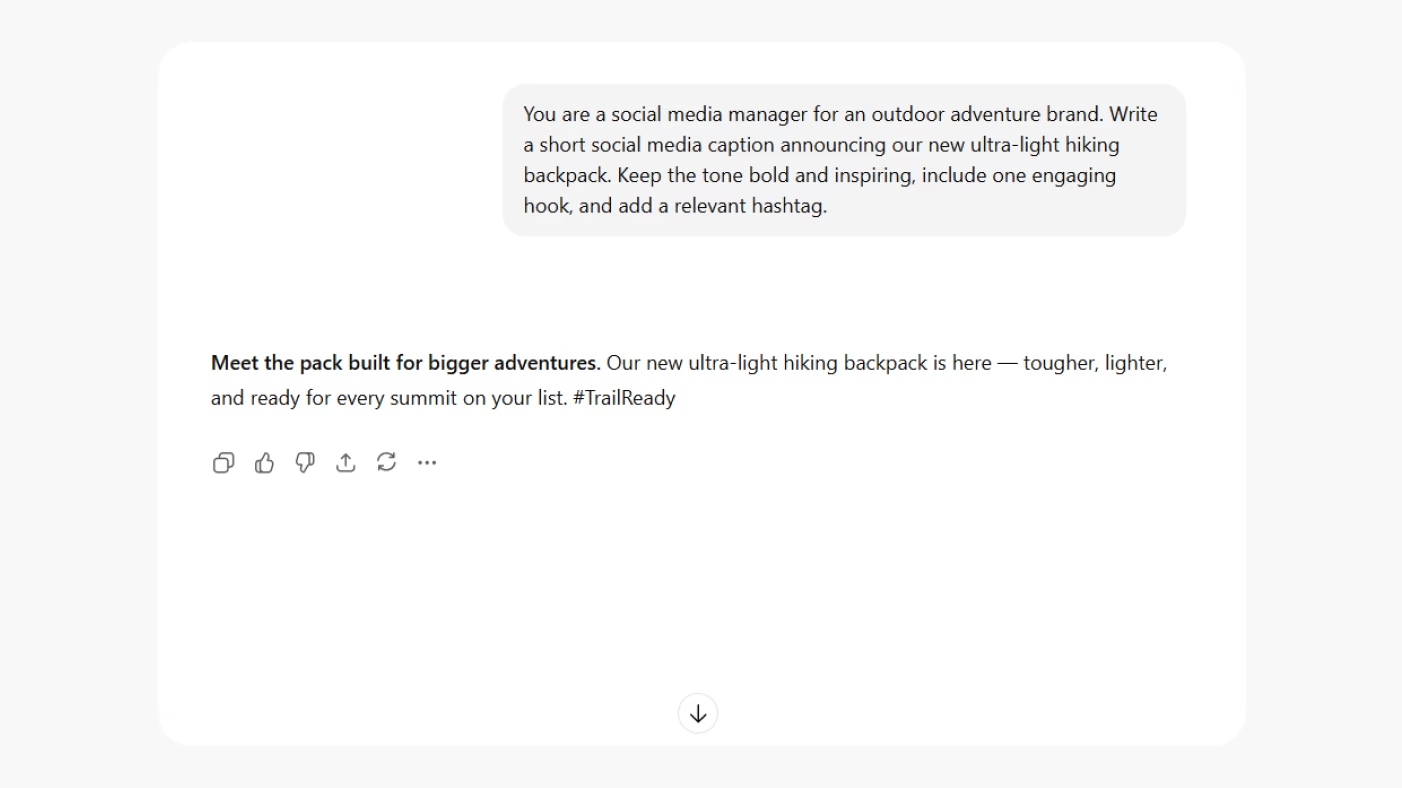
Real-world example: You are a social media manager for an outdoor adventure brand. Write a short social media caption announcing our new ultra-light hiking backpack. Keep the tone bold and inspiring, include one engaging hook, and add a relevant hashtag.
Product Description
Prompt template: You are a product copywriter for a [industry/brand type]. Write a concise product description for a new [product name]. Highlight the key features, explain the main benefit to the customer, and keep the tone [tone style]. Limit the description to around 80–100 words.
Prompt template explanation:
assigns a specific role to guide the level of expertise and writing style
defines the task clearly – a concise product description with benefits and features
uses placeholders such as [product name] and [tone style] to ensure easy customization for any brand or category
the word limit keeps the output sharp, scannable, and eCommerce-friendly
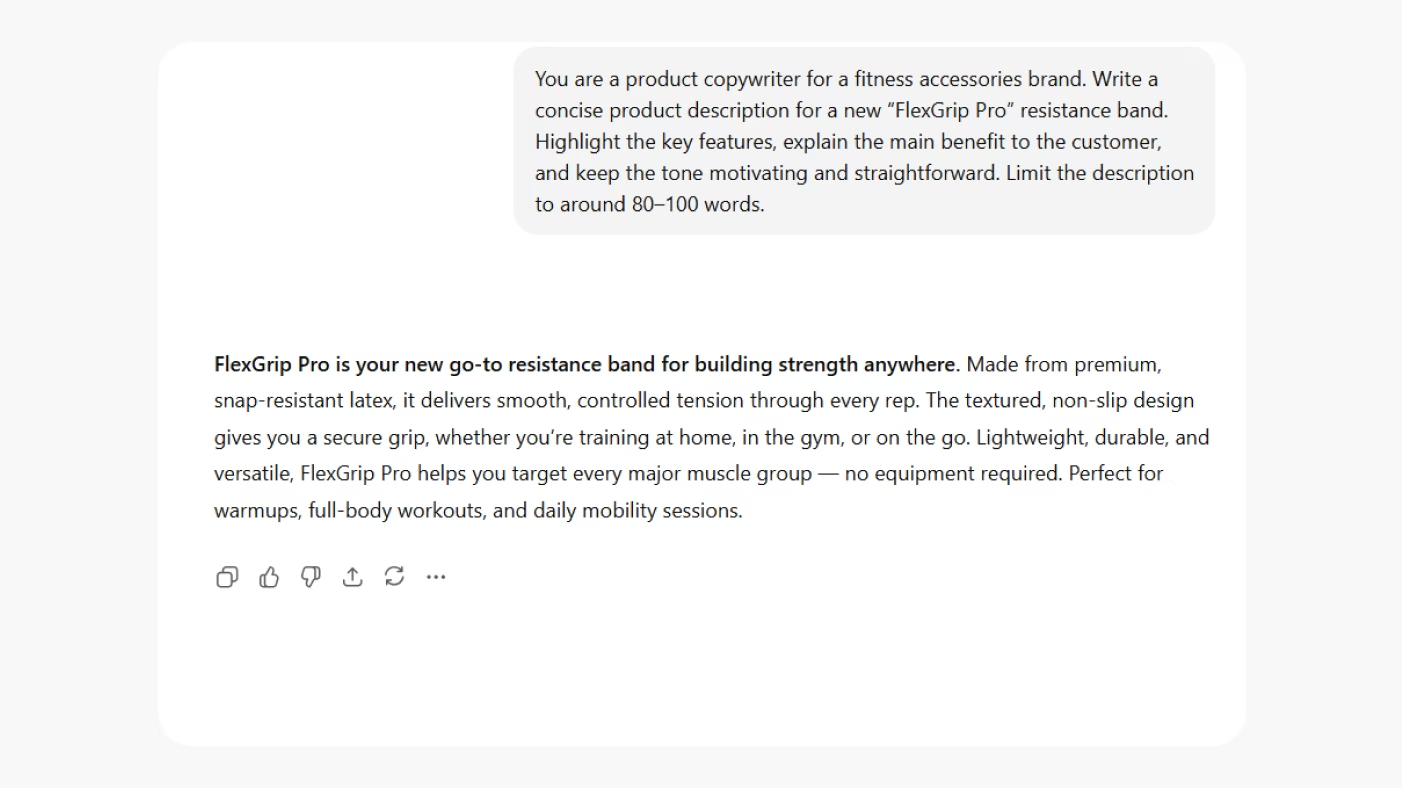
Real-world example: You are a product copywriter for a fitness accessories brand. Write a concise product description for a new “FlexGrip Pro” resistance band. Highlight the key features, explain the main benefit to the customer, and keep the tone motivating and straightforward. Limit the description to around 80–100 words.
Email Campaign
Prompt template: You are an email marketing specialist for a [industry/brand type]. Write a short promotional email announcing [product/offer/event]. Keep the tone [tone style], include a clear value proposition, and end with a strong call to action. Limit the email to 120–150 words.
Prompt template explanation:
defines a professional role that guides tone, clarity, and marketing focus.
sets a specific task (short promotional email) with a clear communication goal.
uses placeholders like [industry/brand type] and [product/offer/event] to make the prompt adaptable across sectors and campaigns
the word limit ensures the output stays concise, scannable, and conversion-focused
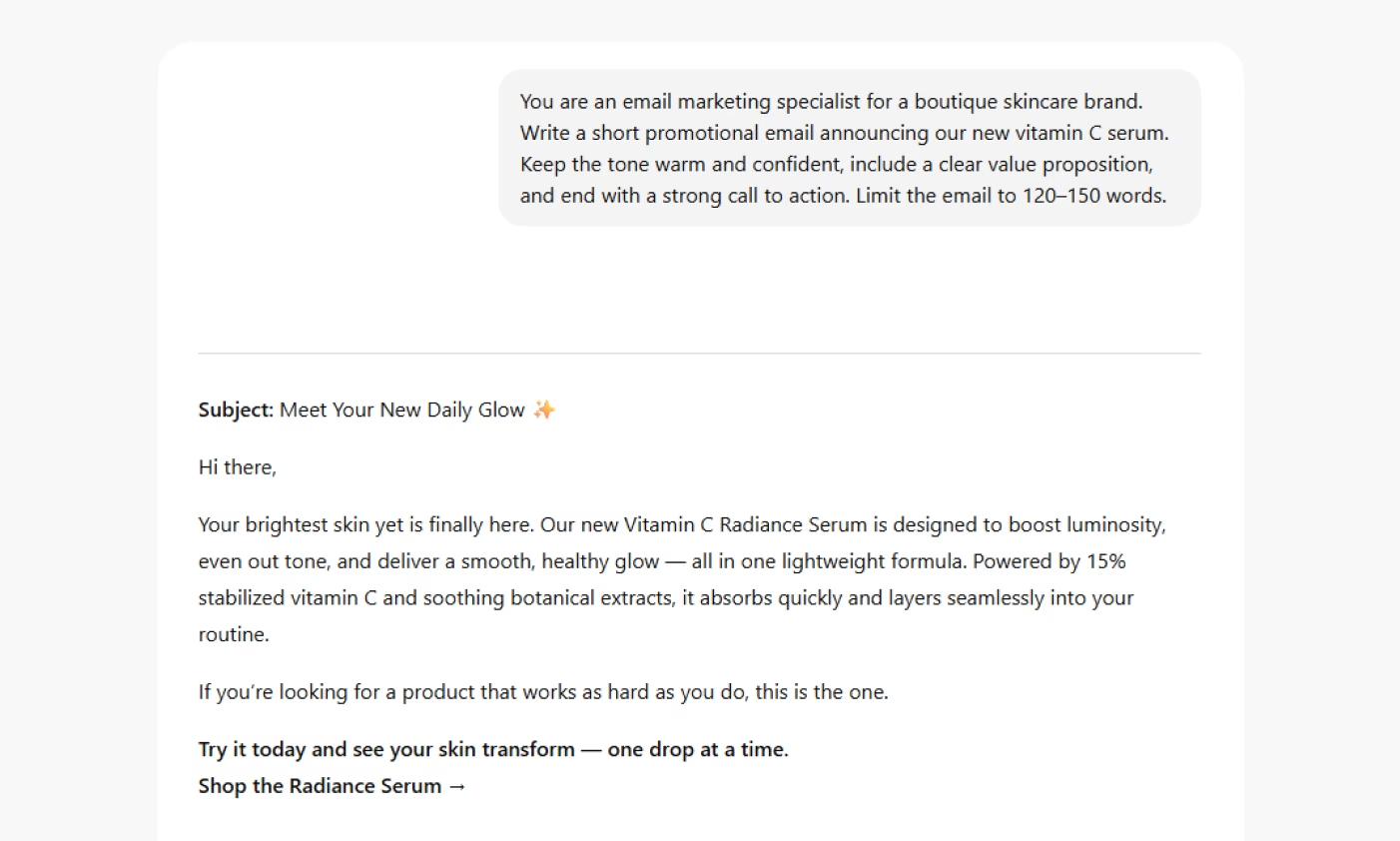
Real-world example: You are an email marketing specialist for a boutique skincare brand. Write a short promotional email announcing our new vitamin C serum. Keep the tone warm and confident, include a clear value proposition, and end with a strong call to action. Limit the email to 120–150 words.
Video Script Outline
Prompt template: You are a video scriptwriter for a [industry/brand type]. Create a structured video script outline for a [video type — e.g., product launch, explainer, testimonial]. Include key scenes, narrator or on-screen dialogue cues, visual directions, and a clear narrative flow. Keep the tone [tone style] and the outline concise.
Prompt template explanation:
establishes a role that guides narrative pacing and visual thinking
defines the format (script outline) and ensures inclusion of both visual and verbal elements
uses placeholders like [video type] and [tone style] so teams can adapt the template for different projects
keeps the structure clear, making it easy to turn the outline into a full script
Real-world example: You are a video scriptwriter for a health and wellness brand. Create a structured video script outline for a 60-second product explainer introducing our new plant-based protein powder. Include key scenes, narrator cues, and simple visual directions. Keep the tone upbeat and encouraging, and make the outline concise.
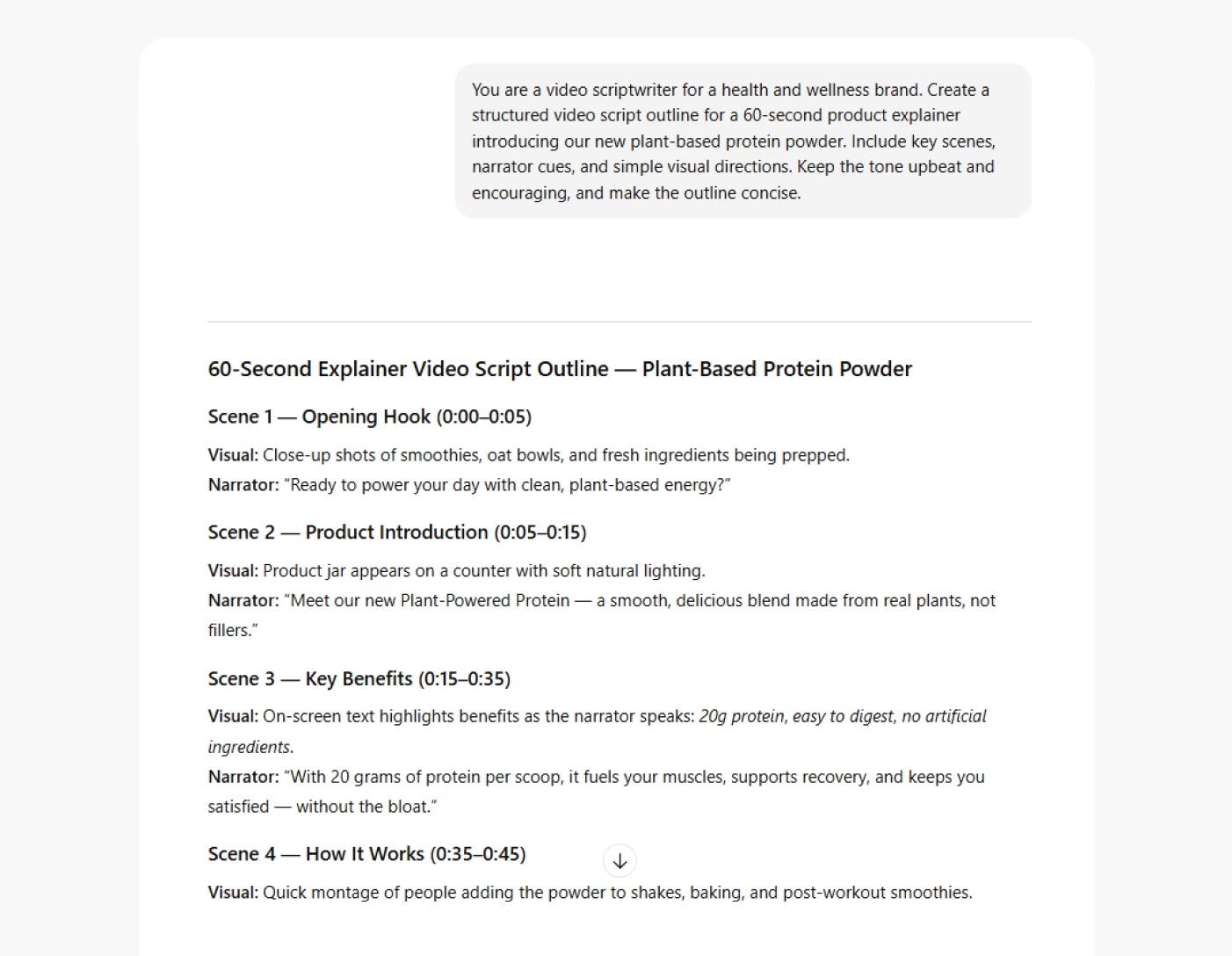
Image Ad Creative Prompt
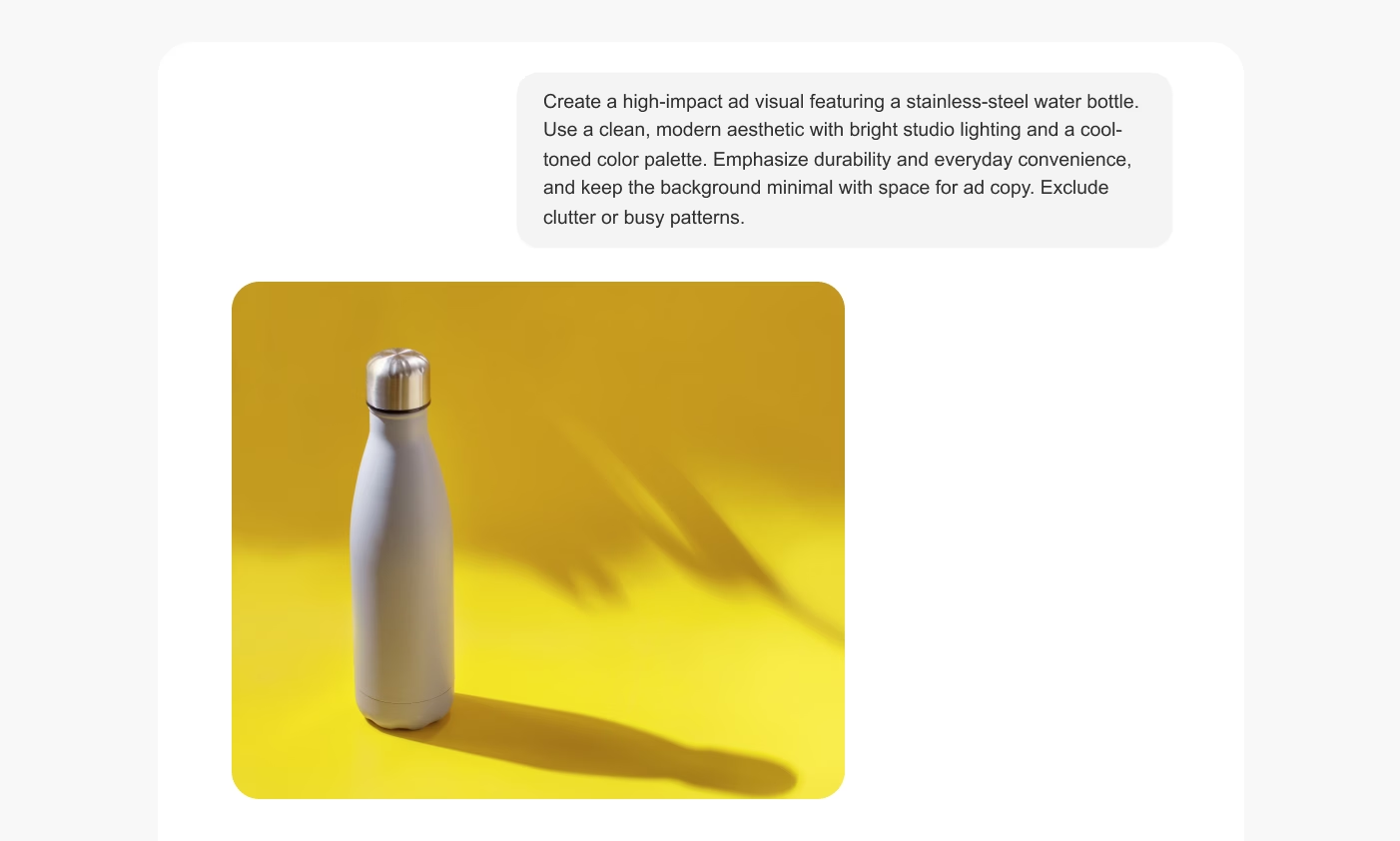
Prompt template: Create a high-impact ad visual featuring [product/subject]. Use a [visual style] aesthetic with [lighting type] and a [color palette]. Emphasize [key benefit or emotion] and keep the background clean with space for ad copy. Include one negative prompt to avoid unwanted elements.
Prompt template explanation:
specifies the visual focus (product/subject) to anchor the composition
defines style, lighting, and color palette – the core components that shape ad-quality visuals
includes a key benefit or emotion to align the image with the campaign message
mentions negative prompts to prevent distracting or off-brand details
ensures the visual is ad-ready by noting space for copy
Real-world example: _Create a high-impact ad visual featuring a stainless-steel water bottle. Use a clean, modern aesthetic with bright studio lighting and a cool-toned color palette. Emphasize durability and everyday convenience, and keep the background minimal with space for ad copy. Exclude clutter or busy patterns. _
Infographic Design
Prompt template: Create an infographic layout about [topic]. Include 3–5 key sections with short, digestible text. Use a [visual style] design approach, a [color palette] that aligns with the brand, and simple iconography. Keep the overall tone clear and informative, and ensure the layout is easy to scan.
Prompt template explanation:
Defines the format (infographic) and the structure (3–5 key sections)
Uses placeholders for topic, visual style, and color palette so teams can adapt the design to any brand
Encourages concise text and simple visuals, which are essential for readability
Ensures the output stays practical and usable across social, blogs, or presentations
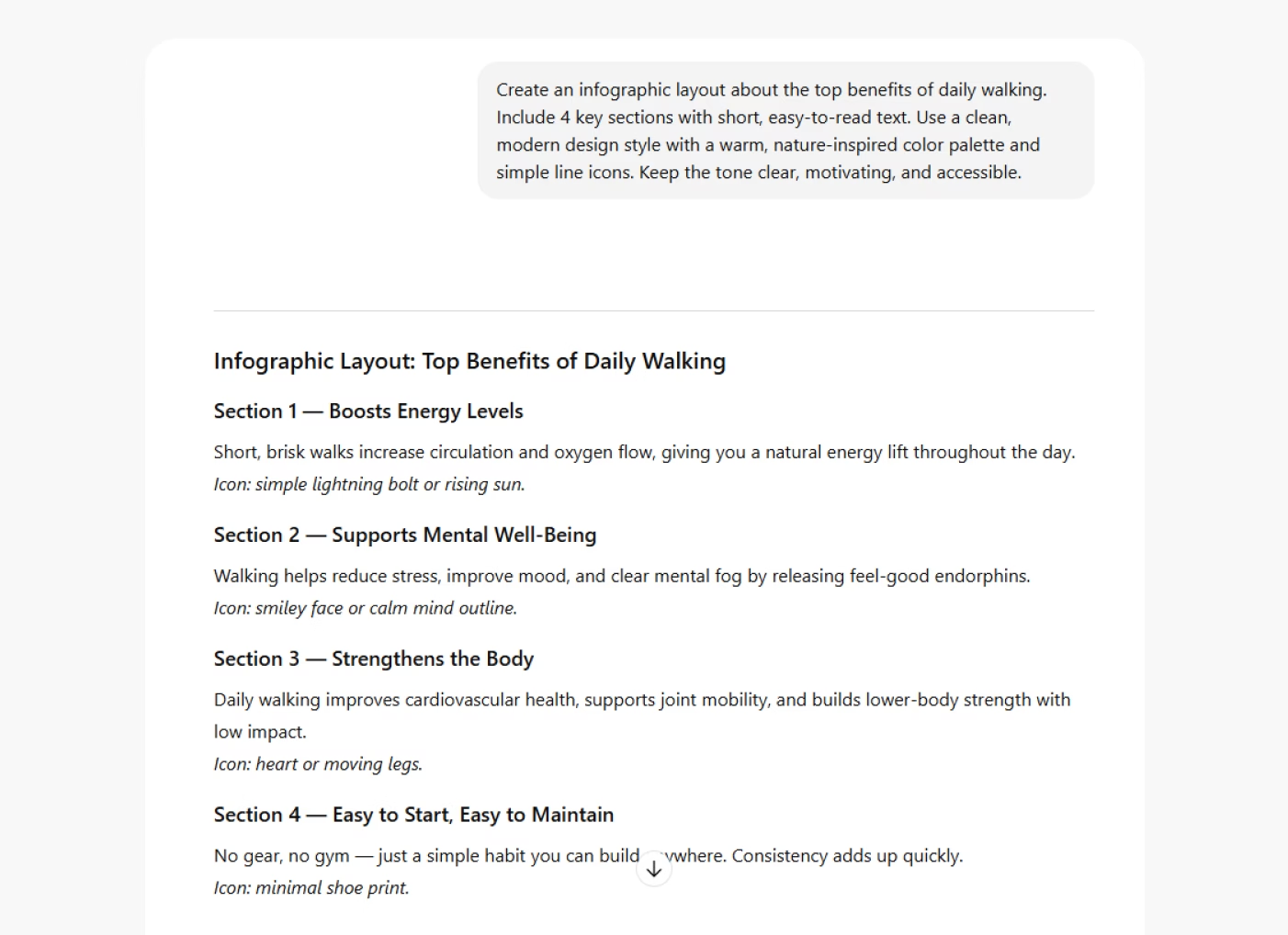
Real-world example: Create an infographic layout about the top benefits of daily walking. Include 4 key sections with short, easy-to-read text. Use a clean, modern design style with a warm, nature-inspired color palette and simple line icons. Keep the tone clear, motivating, and accessible.
SEO Meta Title and Meta Description
Prompt template: Write an SEO meta title and meta description for a page about [topic]. Keep the meta title under 60 characters and the meta description under 155 characters. Include the primary keyword in both, repeat the title phrase at the start of the description, and make the copy clear, compelling, and action-oriented.
Prompt template explanation:
sets strict character limits (under 60 for title, under 155 for description) to ensure proper display in search results
requires repeating the meta title at the beginning of the meta description, which improves clarity and reinforces keyword relevance
ensures the primary keyword appears in both fields — a core SEO best practice
encourages concise, compelling phrasing designed to improve click-through rates
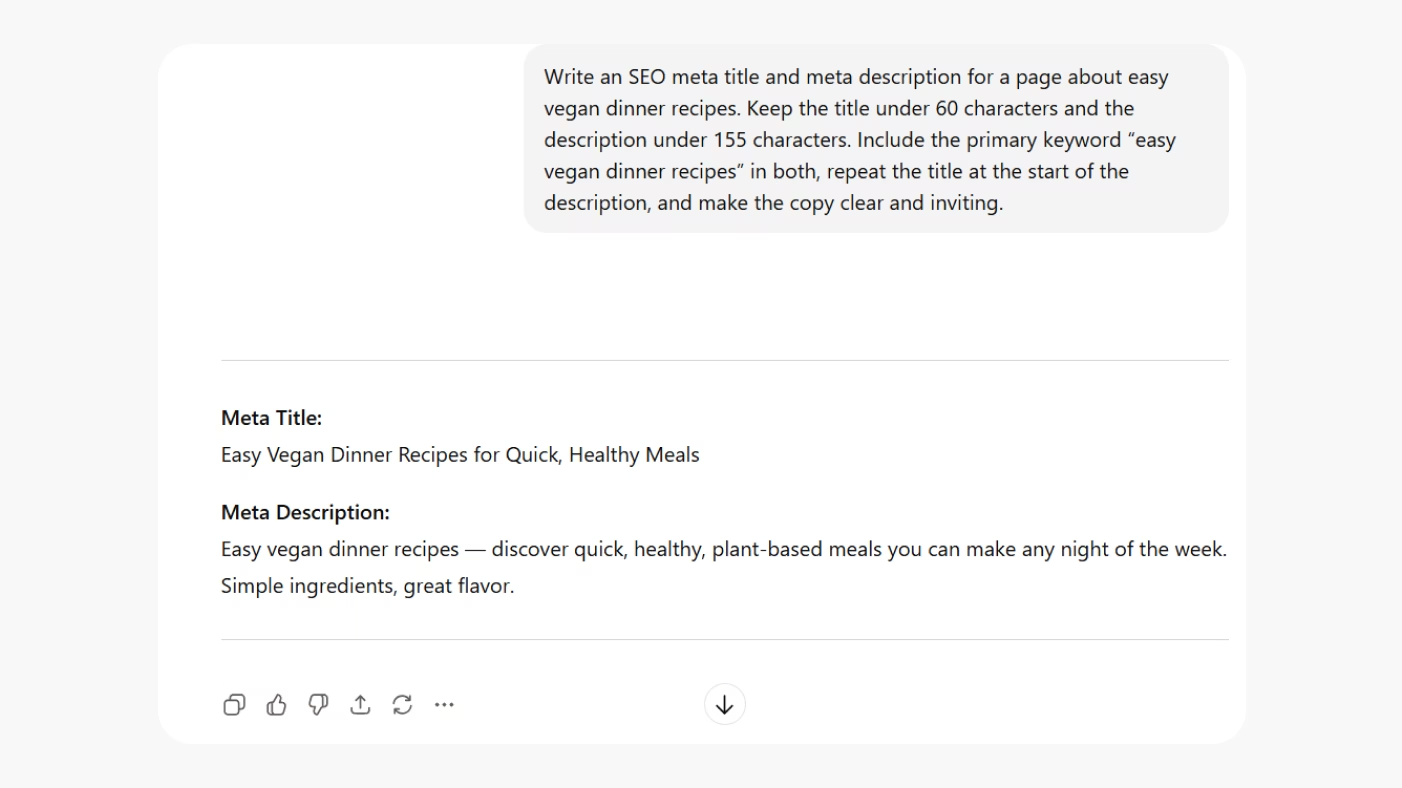
Real-world example: Write an SEO meta title and meta description for a page about easy vegan dinner recipes. Keep the title under 60 characters and the description under 155 characters. Include the primary keyword “easy vegan dinner recipes” in both, repeat the title at the start of the description, and make the copy clear and inviting.
Customer Persona
Prompt template: Create a detailed customer persona for a [industry/brand type]. Include demographic details, goals, motivations, challenges, buying triggers, preferred content formats, and typical objections. Keep the tone clear and practical, and limit the persona to 5–7 concise sections.
Prompt template explanation:
assigns a specific task with defined sections so the AI stays structured and consistent
uses placeholders like [industry/brand type] to make the prompt adaptable to any business
covers the key persona components marketers need: motivations, pain points, objections, and triggers
the section limit keeps the output usable – detailed enough to be insightful, concise enough to screenshot
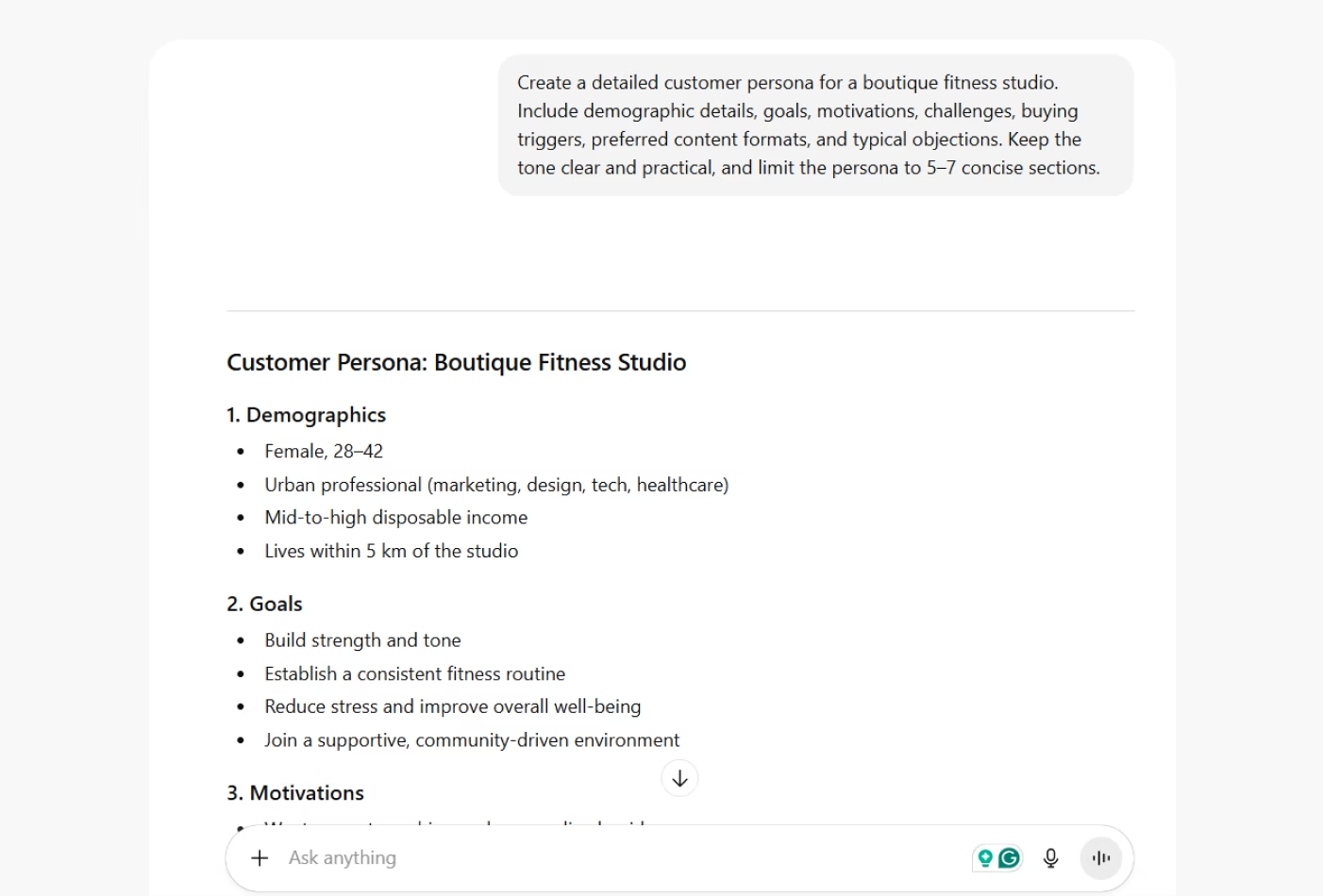
Real-world example: Create a detailed customer persona for a boutique fitness studio. Include demographic details, goals, motivations, challenges, buying triggers, preferred content formats, and typical objections. Keep the tone clear and practical, and limit the persona to 5–7 concise sections.
LinkedIn Post
Prompt template: You are a content marketer for a [industry/brand type]. Write a LinkedIn post about [topic or announcement]. Keep the tone professional but approachable, include a clear insight or takeaway, and format the post for easy scanning with short paragraphs or line breaks.
Prompt template explanation:
assigns a specific role that influences tone and vocabulary suitable for LinkedIn.
defines the topic or announcement while leaving room for customization
instructs the AI to use short paragraphs and line breaks, which improve readability on LinkedIn's feed
ensures the post delivers a takeaway – something readers can learn or act on
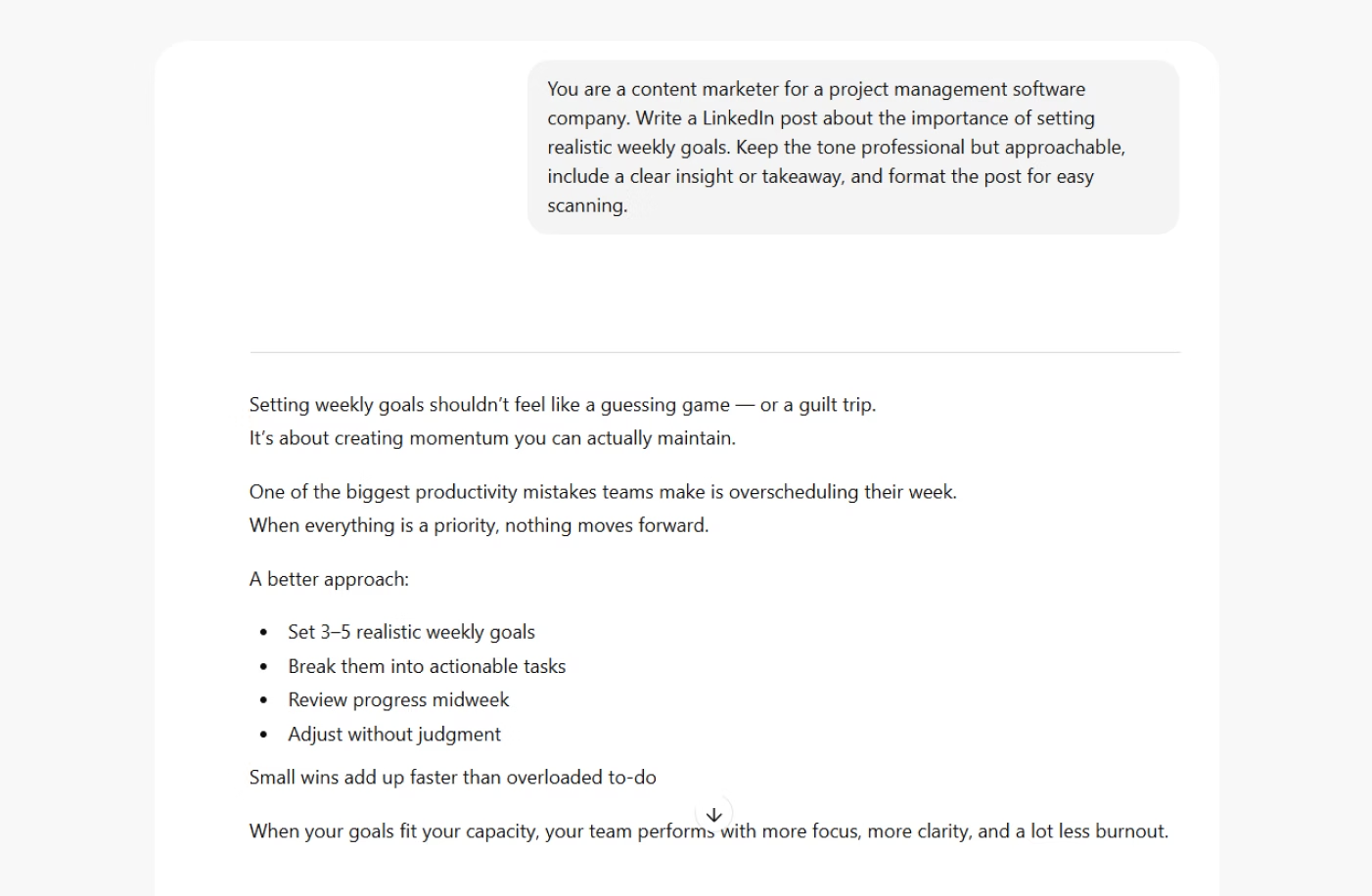
Real-world example: You are a content marketer for a project management software company. Write a LinkedIn post about the importance of setting realistic weekly goals. Keep the tone professional but approachable, include a clear insight or takeaway, and format the post for easy scanning.
[visual 12: LinkedIn Post - output - screenshot]
FAQ Section
Prompt template: Create a short FAQ section for a [product/service/brand]. Include 3–5 common questions and clear, helpful answers. Keep the tone [tone style], avoid jargon, and focus on addressing real customer concerns in a concise, reassuring way.
Prompt template explanation:
defines the format (FAQ) and limits the number of questions to keep the output compact and screenshot-friendly
uses placeholders for [product/service/brand] and [tone style] to ensure easy customization
emphasizes clarity and real customer concerns, helping the AI produce practical, helpful answers
reduces fluff by asking for concise explanations and no jargon
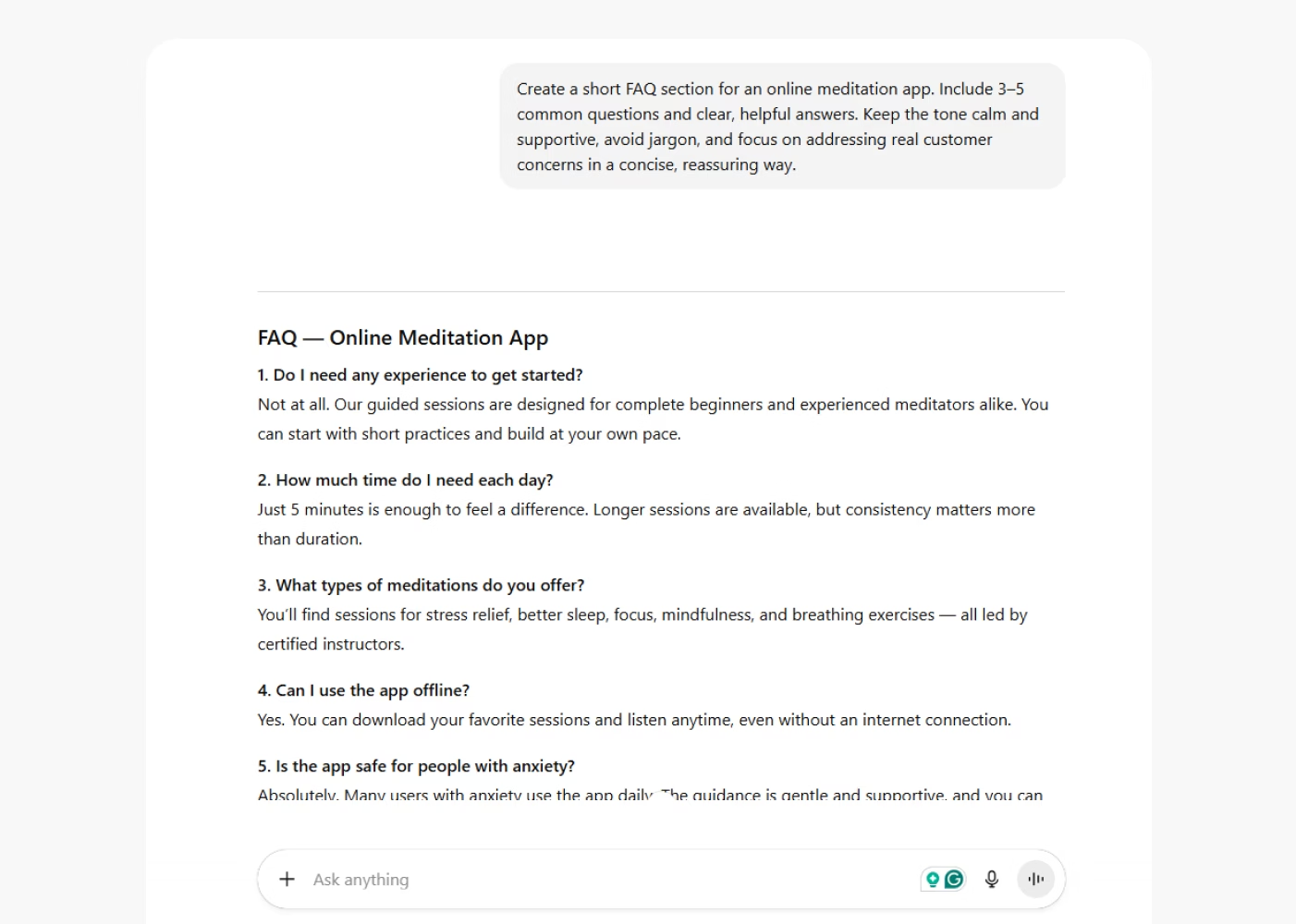
Real-world example: Create a short FAQ section for an online meditation app. Include 3–5 common questions and clear, helpful answers. Keep the tone calm and supportive, avoid jargon, and focus on addressing real customer concerns in a concise, reassuring way.
Common Mistakes & Pitfalls to Avoid
Even with the best intentions, prompt writing can go off track if certain fundamentals are missed. Most issues come from a handful of common mistakes. Once you know what to watch for, it's relatively easy to recognize them.
Being too vague or generic: prompts like "Write a blog post about marketing" or "Create an image of a dog" leave too much room for interpretation. The model has to guess your intent, which usually results in bland or unfocused content. Clear direction leads to sharper, more relevant output.
Combining multiple tasks in one prompt: asking the model to do too many things at once ("Write a blog post, summarize it, and create social captions") often leads to confusion. When tasks compete, the output suffers. Separating requests helps the AI focus and produce higher-quality work for each part.
Providing no context or constraints: without context – audience, brand voice, goal, or key details – the AI defaults to generic language. Without constraints – tone, length, structure – the output can drift or feel off-brand.
Skipping refinement and relying on the first version: the first draft ins't the finish line. Iteration is where quality improves.
Overusing templates without customizing them: templates are great starting points, but they are not one-size-fits-all. When teams rely on the same structure without adding brand, audience, or message details, the content begins to feel repetitive. Personalizing even a few lines keeps output fresh and authentic.
Using too few descriptors (for image prompts): vague image prompts lead to unpredictable visuals. If you don't specify lighting, style, mood, or perspective, the model has to fill in the gaps. Adding descriptors (and using negative prompts when needed) brings clarity and control to the final image.
Advanced Prompt Strategies & Workflows
Once you understand the basics, you can start using prompts in more strategic ways. That means you won't be just creating content, but also streamlining workflows, improving accuracy, and scaling production.
This section covers practical troubleshooting tips, advanced prompting techniques, and methods for building repeatable systems that make AI a reliable part of your content engine.
Troubleshooting Guide
A short section on what to do when prompts don't work as expected. When that happens, small adjustments can usually fix the problem quickly. Here's how to correct the most common issues and steer the AI back on track.
Output is too generic: if the response feels bland or unfocused, tighten the brief. Add specifics about tone, structure, audience, or format to narrow the model's direction.
Output is too rigid: when the writing feels stiff or overly structured, soften the constraints. Ask for a more conversational tone to allow the model creative freedom.
Model "hallucinates": if the AI invents details, give it real data, verified information, or direct quotes to use. You can also instruct it to only use the context provided.
Repetition or circular phrasing: overloaded prompts can cause repetitive outputs. Trim unnecessary details, reset the persona, or start with a fresh, simpler prompt.
Output is too long: if the AI writes more than you need, add a word or character cap. Constraints help the model prioritize what matters most and avoid unnecessary filler.
Output is too short or lacks depth: when the content feels surface-level, ask the model to elaborate on specific sections. Directing where to expand gives you depth without losing focus.
Tone is off-brand: if the voice doesn't sound like your brand, include a sample paragraph or reference style. This anchors the AI in the tone you expect and improves consistency.
Output drifts off-topic: if the content wanders, simplify the prompt and restate the main idea.
Turning Prompts Into a Repeatable Content System
Strong prompts are valuable on their own. But their real power shows up when you turn them into a repeatable system. Instead of starting from scratch each time, you refine your prompts, document what works, and build a workflow that makes content creation faster, more consistent, and fair easier to scale.
The workflow is simple: you start with an initial prompt, refine it through a few rounds of iterations, and then lock in the version that consistently produces the results you want. Once the prompt is reliable, you can integrate it into templates, automation tools, or content pipelines. This turns a single prompt into a reusable asset that supports campaigns, teams, and long-term production.
Over time, these refined prompts become the building blocks of a scalable content engine. They become a system where quality stays high, brand voice stays consistent, and teams can create more without sacrificing accuracy or speed.
Building Prompt Libraries
As you refine prompts and discover what works, the next step is to organize them into a prompt library. A prompt library is simply a centralized collection of your most effective prompts that are documented, tested, and ready for anyone on your team to use. It removes guesswork, improves consistency, and turns prompting into a shared, scalable practice instead of a one-off skill.
A good prompt library includes version history, notes on when to use each prompt, and small variations tailored to different audiences, formats, or channels. This helps teams adapt quickly without reinventing the wheel. When everyone works from the same set of refined prompts, quality becomes easier to control and collaboration becomes smoother.
Prompt libraries also make it possible to onboard new team members faster, align cross-functional teams, and build predictable workflows. Over time, your library becomes a strategic asset, a collection of proven instructions that keep content aligned with your brand, your goals, and your standards. From there, it’s a short step to plugging those prompts into content marketing automation tools so your best instructions are not just documented, but actually driving campaigns in real time.
Advanced Prompt Tactics
Once you're comfortable with the basics, you can start using more advanced prompting techniques to get richer, more accurate, and more tailored outputs. These tactics help you guide the model's reasoning, shape its voice, and break complex tasks into manageable parts. They are especially useful for teams that want consistency, depth, and efficiency at scale.
Few-shot prompting: in few-shot prompting, you show the model a handful of examples before asking it to generate something new. These examples act as a pattern for the AI to follow, shaping tone, structure, and level of detail. It's incredibly effective for formats like product descriptions, FAQs, or social captions where consistency matters. The model learns from the samples and produces output that fits the established style.
Chain-of-thought prompting (high-level description): chain-of-thought prompting encourages the model to work through a problem step by step instead of jumping straight to an answer. You can ask it to explain the reasoning or to walk you through the process, which helps clarify logic and reduce errors. It's useful for analytical content, strategic writing, or any task that benefits from transparent reasoning. Use it sparingly, tho, since over-explaining can make the output longer than needed.
Prompt chaining (sequences): prompt chaining breaks a larger task into smaller, more focused steps. This approach prevents the model from becoming overwhelmed and improves accuracy at each stage. It's ideal for long-term content, multi-step analyses, or workflows you plan to automate.
Self-critique or self-review prompting: in this technique, you ask the AI to review or critique its one output before finalizing it. Prompts like "Evaluate this for clarity and consistency" or "Improve the tone to match X guidelines" help the model iterate internally. It's an efficient way to catch errors or inconsistencies early.
Persona stacking: instead of giving the model just one role, you combine two or three complementary personas. Some prompt examples are "You are a brand strategist and an SEO expert" or "You are a UX writer with a background in behavioral psychology". Persona stacking blends multiple skill sets to create more layered, nuanced results. It's useful when you want content that's strategic and creative at the same time.
Conclusion & Next Steps
Generative AI is no longer a nice-to-have. It's a core part of how modern teams create, test, and ship ideas. But as you've seen throughout this guide, the real leverage doesn't come from the tool alone. It comes from how you talk to it. Strong prompts turn AI from a generic assistant into a focused partner that understands your brand, your audience, and your goals.
By now, you've walked through the fundamentals: defining roles and tasks, adding context, setting format and constraints, using examples, and refining through feedback. You've seen how the same principles apply across text and images, from blog posts and email campaigns to ad visuals and infographics. You've also seen how to troubleshoot weak outputs, avoid common pitfalls, and start building systems instead of one-off prompts.
The next step is simple: experiment and iterate. Take the templates from this guide, plug in your own topics, brand voice, and use cases, and see how the outputs change as you refine the inputs. Keep what works, adjust what doesn't, and start documenting your best-performing prompts. Over time, that becomes your prompt library – a living asset your whole team can use to create faster and more consistently.
If you want to go further, connect your prompting practice to the tools that power your content engine. Recommend Studio helps you do exactly that – it shows you what matters to your audience right now, then helps you turn those insights into on-brand content across channels.
From here, you can dive deeper into topics like AI content automation, content scaling, or image generation for marketing. But the foundation stays the same: clear intent, thoughtful prompts, and a workflow that learns as you go. Start small, ship something, refine it – and let your prompts and your results get better every week.